
Dual Monitor Desk Philippines for Corporate Office Setups
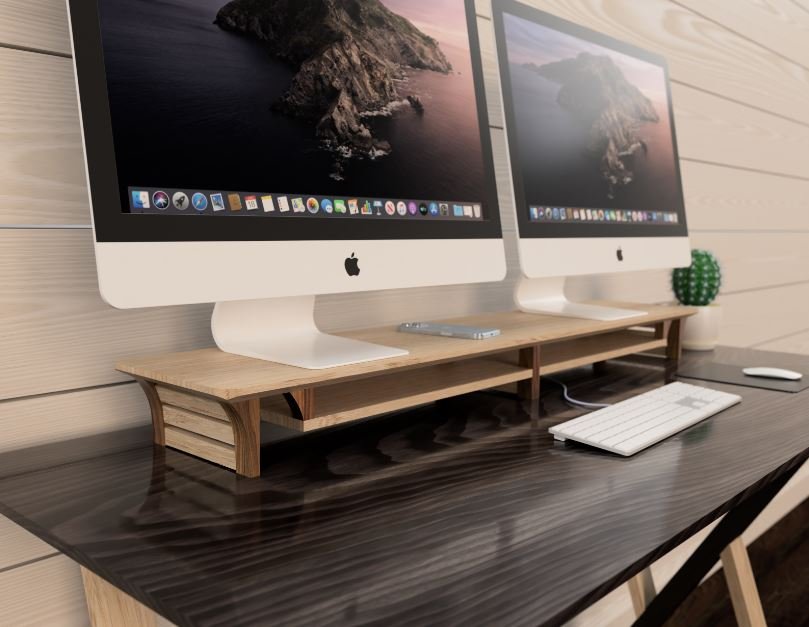
A well-designed workstation plays an important role in employee productivity, comfort, and daily performance. Businesses that use multiple screens need furniture that provides enough working space, proper monitor placement, and organized storage. Choosing the right Dual Monitor Desk Philippines solution helps professionals manage multiple tasks, improve workspace organization, and create a more efficient office environment. From corporate offices in Manila to growing businesses in Quezon City, a suitable dual-monitor workstation can support different working styles while maintaining a clean and professional office appearance.
Why Choose a Dual Monitor Desk for Your Office?
A dual-monitor desk is designed to accommodate two computer screens while providing sufficient room for keyboards, mouse devices, documents, and other office essentials. It is particularly useful for employees who regularly work with multiple applications, spreadsheets, design software, communication platforms, and business management systems.
A spacious workstation allows employees to arrange their equipment comfortably without overcrowding the desktop. It also helps create a more organized working environment, especially in offices where employees spend several hours completing computer-based tasks.
Businesses can choose from different desk sizes, materials, configurations, and storage options depending on their available floor space. Whether setting up a home office, a corporate department, or a professional workstation, the right furniture can make everyday tasks more convenient.
Important Features to Consider When Buying a Dual Monitor Desk
Before purchasing a workstation, businesses should evaluate its size, construction, storage capacity, and compatibility with computer equipment. A desk that looks attractive but lacks sufficient space may not provide the functionality employees need.
Spacious Desktop Surface: A wide tabletop provides enough room for two monitors, a keyboard, mouse, and essential office accessories. Measure both screens and consider their stands or mounting brackets before selecting a desk.
Strong and Durable Construction: The desk should have a stable frame and a durable tabletop that can support computer equipment. Quality materials help maintain the furniture’s appearance and functionality through regular office use.
Cable Management Solutions: Multiple monitors, computers, chargers, and other electronic devices can create unnecessary cable clutter. Cable holes, clips, and under-desk organizers help keep wires arranged and make cleaning easier.
Ergonomic Design: A comfortable desk height allows employees to maintain a natural sitting position. Monitor placement should also support a comfortable viewing angle and reduce unnecessary neck movement.
Storage and Organization: Drawers, shelves, and cabinets provide additional space for documents, stationery, and personal belongings. These features help maintain a clean and professional workstation.
How to Select the Right Dual Monitor Desk for Your Office
Selecting the appropriate Dual Monitor Desk Philippines requires understanding how employees use their workstations. A graphic designer may need more surface area for design equipment, while an accountant may prioritize document storage and space for multiple applications.
For corporate offices, consistency is another important consideration. Choosing desks with similar designs and finishes creates a coordinated appearance throughout different departments. However, individual workstation requirements should also be considered when selecting furniture.
Businesses should measure their available office space before ordering. Consider the desk width, depth, chair movement, walking areas, and access to electrical outlets. A well-planned layout prevents overcrowding and allows employees to move comfortably.
An L-shaped workstation can be a practical choice for employees who need additional surface space. A rectangular computer desk may work better in smaller offices or shared workspaces. Adjustable desks can also support employees who prefer alternating between sitting and standing during the workday.
Modern Office Table Designs for Productive Workspaces
Modern offices require furniture that combines practical functionality with a professional appearance. Office tables are available in different materials, finishes, and configurations, allowing businesses to create workspaces that reflect their operational needs.
A minimalist desk with a neutral finish can complement contemporary office interiors. Wooden-look surfaces provide a warm appearance, while metal frames offer a clean and structured design. Laminated tabletops are another option for offices looking for practical surfaces that are easy to maintain.
The choice of office furniture should also match the overall interior design. Desks, chairs, storage cabinets, and meeting tables should work together to create a balanced environment.
Modern Office Table Designs can be considered when planning workstations that accommodate technology, employee comfort, and organized office layouts. Businesses should compare dimensions, material options, storage features, and available customization before making a final decision.
Benefits of Ergonomic Office Furniture for Employees
Ergonomic furniture supports comfortable working positions and helps employees arrange their work equipment according to their needs. A dual-monitor workstation should provide sufficient room to position both screens without forcing employees to sit at awkward angles.
When two monitors are used regularly, positioning them at an appropriate viewing height and distance is important. Employees who use both screens equally may place them side by side, with the primary viewing area centered in front of them. Those who use one screen more frequently can position it directly in front.
An adjustable monitor arm can provide additional flexibility. It may also free up valuable desktop space compared with traditional monitor stands. However, the desk must be compatible with the mounting system and strong enough to support the equipment.
Companies should consider ergonomic office chair selection alongside desk design. A supportive chair with adjustable height, back support, and armrests can help employees maintain a more comfortable sitting position.
Office Furniture Services for Businesses in Manila and Quezon City
Selecting office furniture involves more than purchasing individual tables and chairs. Businesses often need professional assistance with workspace planning, furniture selection, installation, and long-term maintenance. The following services are important considerations when developing a functional office environment.
Office Furniture Customization Services
Custom office furniture allows businesses to select desk dimensions, materials, finishes, and storage arrangements based on their requirements. Customized workstations can be useful for departments that need additional monitor space, integrated drawers, or specific equipment arrangements.
For offices in Manila and Quezon City, customized furniture can help make better use of available floor space. Companies can consider matching workstation designs to their existing interiors and operational requirements.
Office Furniture Installation Services
Office furniture installation helps businesses arrange desks, chairs, partitions, and storage units according to their planned layouts. Proper installation is especially important for large offices where multiple workstations need to be assembled and positioned consistently.
A well-organized installation process can reduce unnecessary disruption and help employees return to their daily activities more efficiently.
Office Space Planning and Consultation
Office space planning helps businesses determine the best furniture arrangement for their available floor area. It considers employee movement, workstation spacing, storage requirements, meeting areas, and access to essential facilities.
Professional office furniture consultation can also help procurement teams compare different desk configurations, materials, and furniture solutions before making purchasing decisions.
Office Furniture Repair and Maintenance
Office furniture repair and maintenance helps businesses keep their workstations in usable condition. Regular inspection can identify loose screws, damaged edges, unstable desk frames, and problems with drawers or adjustable components.
Cleaning furniture with suitable products and avoiding excessive weight on desktop surfaces can also help maintain its condition over time.
Office Furniture Delivery Services
Office furniture delivery is an important consideration when furnishing new offices or upgrading existing workspaces. Businesses should confirm delivery schedules, access arrangements, unloading requirements, and installation availability before placing large orders.
These details are particularly important for corporate buildings with restricted delivery hours or limited loading areas.
Best Dual Monitor Desk Options for Different Office Environments
Different workplaces have different furniture requirements. Selecting a suitable workstation depends on the number of employees, available space, equipment requirements, and daily activities.
Corporate Offices: Corporate employees often use multiple applications and communication tools. Spacious dual-monitor desks with built-in storage can support organized and professional workstations.
Home Offices: Remote workers benefit from compact computer desks that accommodate two screens without taking up excessive room. Simple designs with cable management features can help maintain an organized home workspace.
IT and Technology Departments: Technical employees may require larger desks for multiple monitors, computer towers, keyboards, and additional equipment. Strong desk frames and accessible cable management are useful features.
Schools and Training Centers: Educational institutions can consider durable computer desks for computer laboratories, administrative offices, and training rooms. Easy-to-clean surfaces and practical designs are important for frequently used furniture.
Hospitals and Healthcare Facilities: Administrative departments and healthcare offices may require organized workstations for documentation, scheduling, and computer-based activities. Functional desks with convenient storage can support these requirements.
How Dual Monitor Desks Improve Office Organization
An organized workstation makes it easier for employees to manage their daily responsibilities. When monitors, documents, and accessories have designated positions, employees can spend less time rearranging their equipment.
Dual-monitor desks also support different working processes. For example, an employee can use one screen for spreadsheets and another for communication or reference materials. Designers can work on creative projects while keeping reference images or project instructions visible.
Businesses should also consider additional furniture to complement their computer workstations. Filing cabinets provide space for important documents, while mobile pedestals offer convenient storage near individual desks. Office partitions can help separate work areas, and meeting tables provide dedicated spaces for discussions and collaboration.
Combining suitable furniture pieces creates a more functional office environment without making the workspace feel overcrowded.
Tips for Maintaining Your Dual Monitor Office Desk
Regular maintenance helps protect office furniture from everyday wear and tear. Businesses should establish simple cleaning and inspection routines to maintain their workstations.
- Clean the tabletop regularly using a suitable cleaning cloth and material-safe products.
- Avoid placing excessive weight on the desk surface.
- Keep liquids away from monitors, electrical equipment, and wooden surfaces.
- Arrange cables properly to prevent tangling and accidental damage.
- Check desk frames, screws, and joints periodically.
- Use monitor arms according to their recommended weight capacity.
- Avoid dragging heavy equipment across laminated surfaces.
- Keep drawers and storage compartments clean and organized.
These practices help maintain a professional workspace while supporting the long-term usability of office furniture.
What to Check Before Ordering a Dual Monitor Desk in the Philippines
Businesses should compare several factors before choosing a workstation. A careful purchasing decision can prevent unnecessary expenses and furniture replacement.
| Buying consideration | What to evaluate |
| Desk dimensions | Enough width and depth for two monitors |
| Material | Durable and easy-to-maintain construction |
| Frame | Stable support for computer equipment |
| Cable management | Proper wire organization |
| Storage | Drawers, shelves, or cabinets |
| Ergonomics | Suitable desk height and monitor positioning |
| Customization | Available sizes, finishes, and configurations |
| Installation | Assembly and installation requirements |
| Warranty | Product coverage and after-sales support |
Companies in Manila and Quezon City should also consider delivery arrangements and available after-sales assistance when comparing furniture suppliers.
Frequently Asked Questions About Dual Monitor Desks
What is the ideal desk size for two monitors?
A desk approximately 120–160 cm wide may accommodate many two-monitor setups, depending on screen sizes and additional equipment. Larger screens or extra accessories may require more space.
Is an L-shaped desk suitable for dual monitors?
Yes. An L-shaped desk can provide additional surface area for two monitors, documents, and other office equipment while making use of corner spaces.
Which material is suitable for a dual-monitor office desk?
Laminated engineered wood, MDF, and solid wood are common options. The best choice depends on the required durability, budget, appearance, and maintenance needs.
Can a dual monitor desk support monitor arms?
Many desks can accommodate monitor arms, provided the tabletop thickness, mounting arrangement, and weight capacity are compatible with the selected monitor mount.
Are dual monitor desks suitable for small offices?
Yes. Compact rectangular desks and carefully planned corner workstations can accommodate two monitors in smaller offices. Measuring the available space is essential.
What other furniture should businesses purchase with computer desks?
Businesses may also need ergonomic office chairs, filing cabinets, mobile pedestals, office partitions, storage cabinets, and meeting tables.
Where can businesses find office furniture in Manila and Quezon City?
Businesses can explore office furniture suppliers serving Manila and Quezon City and compare their desk designs, materials, customization options, delivery arrangements, and installation services.
Create a More Organized Workplace with Modern Office Table Designs
Choosing the right workstation is an important investment in office functionality, employee comfort, and workspace organization. A suitable dual-monitor desk provides enough room for computer equipment, supports practical workstation arrangements, and helps businesses maintain a professional office environment.
Modern Office Table Designs focuses on the importance of practical and well-planned office furniture solutions for businesses looking to create productive work environments. By choosing furniture that meets everyday operational requirements, companies can build organized workspaces that support their teams and future business needs.